
QuoteIQ: Field Service CRM
QuoteIQBusiness
4.4702.00 Reviews
- Version
- 2026.08.20
- Installs
- 10.00K
- Age Rating
- Everyone
Screenshots



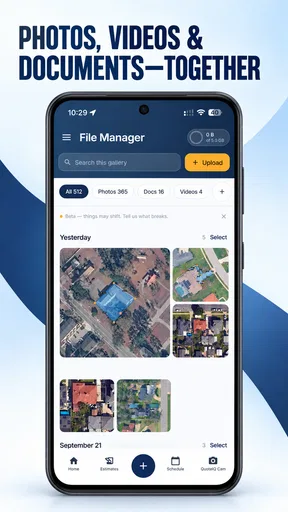



Our Review of QuoteIQ: Field Service CRM
 Analysis by Appyee
Ever stumbled upon an app that feels like a hidden gem? Well, that’s exactly what QuoteIQ is for me. If you’re into quotes that inspire, motivate, or simply make you ponder for a moment, then this app might just become your new go-to. I’ve been diving into it for a while now, and I’m here to spill the beans on why it’s worth a spot on your home screen.
The Allure of Quotes
We all have those days when a little boost can go a long way. That’s where quotes come in. Whether it’s a line from a favorite book or a nugget of wisdom from a renowned thinker, quotes have this uncanny ability to resonate with us on a deeper level. QuoteIQ takes this concept and turns it into an app that’s both delightful and easy to navigate.
Sleek and User-Friendly Interface
First things first, let’s talk about the interface. Navigating through QuoteIQ is as smooth as butter. The design is minimalist, which I personally adore because it lets the quotes take center stage. You’re not bogged down by flashy graphics or unnecessary frills. Instead, the focus remains on the words themselves, which is refreshing.
The app loads quickly, and the layout is intuitive. You can easily browse through categories or search for specific authors and themes. Whether you’re in the mood for something motivational, humorous, or philosophical, finding the right quote is just a tap away.
Customization at Its Best
One of the standout features for me is the level of customization QuoteIQ offers. You can tailor the app to fit your personal style and preferences. Fancy a particular font or color scheme? Go for it. Want to save your favorite quotes or create collections? That’s a breeze too. The app lets you make it your own, which is a nice touch.
There’s also a nifty feature that lets you set daily quotes to pop up as notifications. It’s like having a little daily dose of inspiration delivered right to your phone. I’ve found this particularly uplifting on those sluggish mornings when you need a gentle nudge to get going.
Sharing the Wisdom
Another aspect I love is how easy it is to share quotes directly from the app. Whether you want to inspire your friends on social media or send a thoughtful message to someone special, QuoteIQ makes it simple. A couple of taps and you’re all set to spread the wisdom.
Plus, the app supports multiple sharing platforms, so whether you’re a fan of Instagram, Twitter, or WhatsApp, you’re covered. Sharing something meaningful has never been this seamless.
Rich Library of Quotes
The heart of QuoteIQ is undoubtedly its vast library of quotes. The app boasts an impressive collection from a wide array of authors and themes. From ancient philosophers to modern-day thinkers, the diversity is commendable. You’ll find everything from timeless classics to lesser-known gems that deserve more attention.
The categorization is spot-on, allowing you to dive into specific themes like love, friendship, or perseverance. It’s like having a personal library of wisdom right at your fingertips, ready to be explored whenever you wish.
Wrapping It Up
In conclusion, QuoteIQ is more than just an app; it’s a pocket-sized companion for those who love to reflect and be inspired by words. Its user-friendly design, customization options, and rich library make it a standout choice for quote enthusiasts like myself.
Whether you’re new to the world of quotes or a seasoned aficionado, QuoteIQ offers something special for everyone. So, if you’re ready to add a sprinkle of wisdom to your daily routine, give this app a try. Trust me, you won’t be disappointed!
Verdict
Strengths of QuoteIQ: Field Service CRM
- User-friendly interface enhances navigation.
- Extensive quote library for diverse topics.
- Customizable notifications for daily quotes.
- Offline access available for convenience.
- Share quotes easily on social media platforms.
Limitations of QuoteIQ: Field Service CRM
- Limited font options for customization.
- Ads can be intrusive during use.
- No text-to-speech feature available.
- In-app purchases required for premium features.
- Occasional crashes reported on older devices.
Similar Picks in This Category
View All
LinkedIn: Community & Network
LinkedIn3.8

Zoom Workplace
zoom.com4.1

Microsoft Teams
Microsoft Corporation4.6

Meta Business Suite
Meta Platforms, Inc.4.6

Webex Meetings
Cisco Systems, Inc.4.5

TeamViewer Remote Control
TeamViewer4.4
Frequently Asked Questions
What is QuoteIQ and how does it work?
QuoteIQ is an innovative app designed to help users manage and track quotes efficiently. It allows you to create, store, and organize quotes from various sources, making it easy to access them whenever needed. With features like categorization, search functionality, and sharing options, QuoteIQ ensures that your favorite quotes are always at your fingertips.
Is QuoteIQ available on both Android and iOS devices?
Yes, QuoteIQ is available for download on both Android and iOS platforms. The app is optimized for each operating system, providing a seamless user experience whether you're using a smartphone or a tablet. You can find QuoteIQ on the Google Play Store for Android devices and the App Store for iOS devices.
Does QuoteIQ require an internet connection to function?
QuoteIQ primarily works offline, allowing you to access and organize your quotes without needing an internet connection. However, certain features like syncing your data across devices and sharing quotes with friends will require internet access. Rest assured, your offline experience remains robust and comprehensive.
Are there any in-app purchases or subscriptions in QuoteIQ?
While QuoteIQ is free to download, it does offer in-app purchases for premium features. These may include advanced search capabilities, additional categorization options, and an ad-free experience. Users have the option to subscribe to these premium features on a monthly or yearly basis, depending on their needs.
How secure is my data on QuoteIQ?
QuoteIQ takes data security seriously, employing encryption and secure servers to protect your information. While the app allows for data backup and syncing, all transfers are encrypted to ensure your privacy. Users can also enable additional security features like passcode protection to safeguard their quotes within the app.
